Introduction: The Alluring Promise of Instant AI Avatars
The internet is buzzing with the incredible promise of creating realistic, talking AI avatars from a single photo. Slick tutorials make it look simple, fast, and completely free—a revolutionary power at your fingertips. You upload a picture, type some text, and a lifelike digital human speaks your words. It sounds like magic.
But what happens when you actually try it? While the technology is undeniably impressive, the hands-on process reveals surprising quirks, hidden limitations, and crucial insights that aren’t always apparent in a quick demo. This article explores the most impactful lessons learned from a hands-on experiment with today’s leading free tools, revealing what you really need to know before you start.
1. It’s a Multi-Tool Workflow, Not a Magic Button
Creating a high-quality talking avatar isn’t accomplished with a single, all-in-one application. The reality is that the best results come from combining specialized tools, each excelling at a different part of the process. One tool generates the perfect static image, and another brings that image to life with animation and audio.
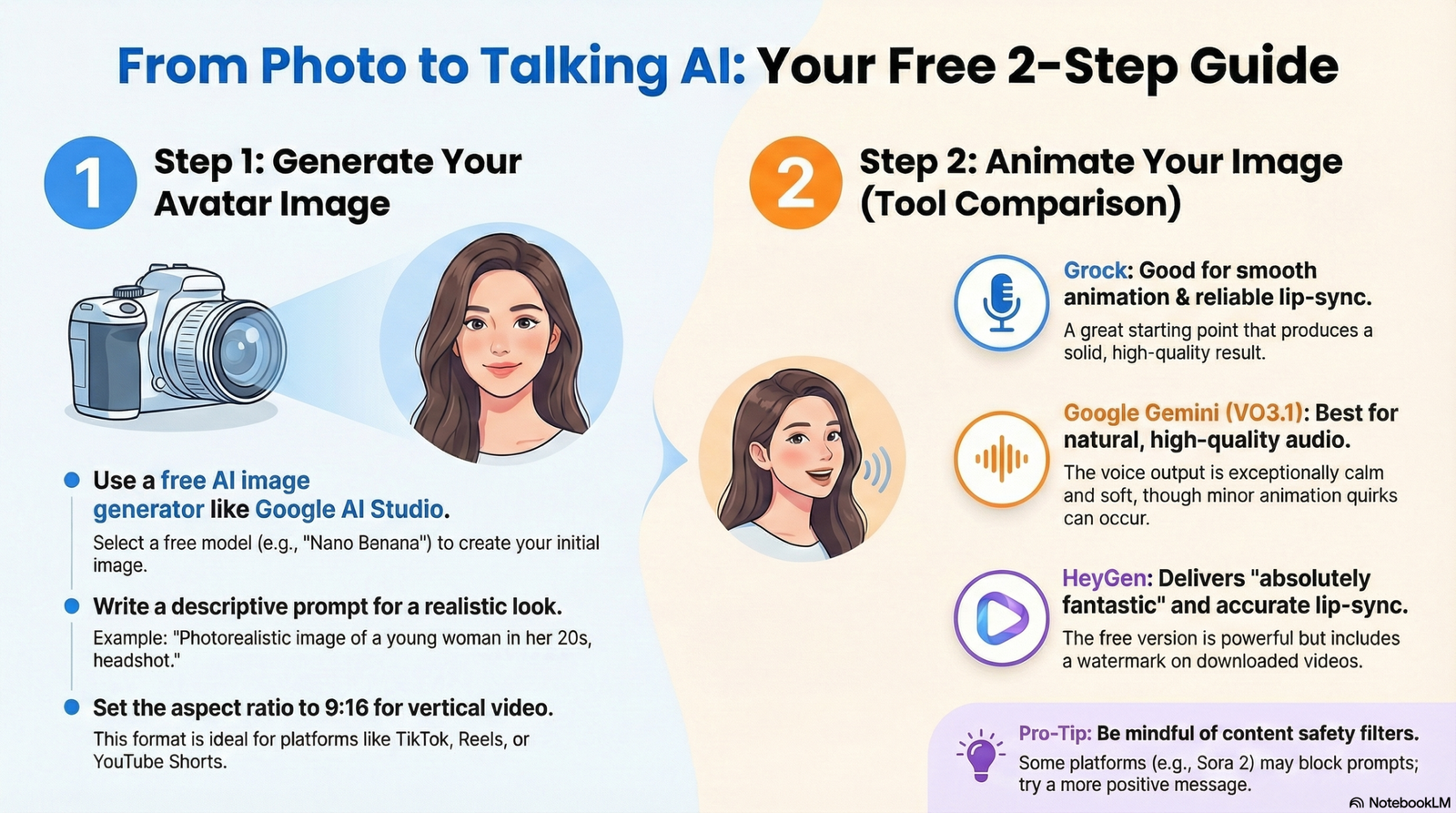
In this experiment, the workflow involved two distinct steps. First, Google AI Studio was used with its “Nano Banana” model to generate a “photorealistic image of a young American woman” from a text prompt. Then, that high-quality static image was uploaded into separate animation platforms like Grock and HeyGen to be animated. This “chaining” of tools is a more realistic representation of creative AI work today, shifting the focus from finding one perfect app to mastering a flexible, multi-stage workflow.
2. “Free” Has Its Limits (and Watermarks)
While it’s absolutely possible to create a talking avatar without spending any money, the free tiers of these powerful platforms come with specific catches. “Free” is often a gateway to test the technology, but it has practical limitations for anyone looking to create professional, polished content.
The most significant limitation is often watermarking. With a platform like HeyGen, which produces incredibly high-quality results, the free plan comes with a major caveat.
“…unless you upgrade to the creator to your subscription you unfortunately can’t download your videos without the HeyGen watermark appearing on them.”
This fine print isn’t limited to the final video output. Even during the initial image generation phase in Google AI Studio, a roadblock appeared. The creator attempted to use the “Nano Banana Pro” model but had to switch to the “older model Nano Banana” because the pro version required a paid subscription. Furthermore, while HeyGen’s free plan is powerful, it outputs video at 720p; upgrading to a paid plan is required to unlock crystal-clear 1080p resolution. The takeaway is clear: “free” is fantastic for experimenting and learning, but users planning to produce professional content should be prepared for watermarks or the need to upgrade.
3. Expect the Unexpected: AI Gets Weird
Even when you follow all the steps perfectly, the AI models can produce unexpected, quirky, or downright failed results. This experiment revealed that the path from image to video is not always a smooth one.
A striking example was the attempt to use the Sora 2 model via the Dig AI platform. When prompted to generate a video with the message “Love is a language stronger than hate,” the platform completely blocked the request. It cited a “violation of the platform’s content guard rails or safety guidelines,” a surprising and confusing response to such a positive and harmless phrase.
Another quirk appeared when using Google Gemini’s VO3.1 model. While the audio quality was “wonderful and natural sounding,” the AI inexplicably repeated a word in the middle of the sentence. The final audio came out with a noticeable stutter:
“love is a language stronger stronger than hate”
These examples are a fascinating look into the unpredictable nature and built-in constraints of current AI. They serve as a powerful reminder that this is still a developing technology, and a little trial and error is part of the creative process.
4. Choose Your Tool Based on the Desired “Personality”
The choice of AI animation tool is not just a technical decision but a creative one, as each platform imparts a unique style and quality to the final video. More importantly, the experiment revealed that getting the best results isn’t just about picking the right tool—it’s about elevating your creative input to match the tool’s capabilities.
The initial tests on Grock and Google Gemini used the same simple prompt: “Love is a language stronger than hate.”
- Grock: Delivered a “wonderful response” where the “lip sync looks pretty good and the animation is quite smooth.” It produced a solid, reliable result from a basic instruction.
- Google Gemini (VO3.1): Despite the audio stutter, its sound quality was distinct, described as “much softer even calmer and the overall feel is just wonderful and natural sounding.” This platform imparted a unique audio tone, even with its glitch.
However, the approach shifted for HeyGen, a more sophisticated platform. Instead of reusing the simple phrase, the creative input was elevated. A specific, high-quality voice (“Ivy”) was selected from its library, and a more eloquent script was provided: “Darkness cannot drive out darkness; only light can do that. Hate cannot drive out hate; only love can do that.” The result was a significant leap in quality.
- HeyGen: Produced an output that was “absolutely fantastic,” with lip-sync that was “incredibly accurate and natural-looking.”
This demonstrates a crucial lesson: as you move to more advanced platforms, they invite more deliberate creative choices. The superior outcome from HeyGen wasn’t just because the tool was better, but because the process involved thoughtful scripting and voice selection. The best results come from a synergy between a powerful tool and a well-considered creative vision.
Conclusion: Your Turn to Create
The journey of creating a free AI avatar is more nuanced than it first appears. The process is a multi-tool workflow, not a single click. “Free” comes with fine print like watermarks and feature restrictions. The AI itself can be unpredictable. And critically, each tool has its own distinct personality that rewards a thoughtful creative approach.
Despite these nuances, the power these platforms offer is undeniable. They grant creators the ability to bring static images to life without expensive software, complex skills, or professional production teams. The barrier to creating compelling visual content has never been lower.
Now that you know the reality behind the hype, what surprising or creative story will you make your AI avatar tell first?